Wednesday, July 13, 2016

C - Monte Carlo Method

In the following article, I'll create an application which will obtain the volume of a cylinder with the Monte Carlo method (https://en.wikipedia.org/wiki/Monte_Carlo_method). I'm not going to give a detailed explanation of the Monte Carlo method, but just how to use it in the current application. Basically, the Monte Carlo method use a random generator which gives correct and incorrect values of our problem. The amount of correct results over the incorrect will give us an approximative value our problem. In the current example, I'll first create an integer random generator, which will give points inside cube and we must check then if the points are in the cylinder or not. As this is an approximative method, we must do the test several times to have a more accurate result, thus having more samples, the result will be more accurate too.

The application can be divided in 4 files:
  • The main file (main.c): which will handle all the main methods of the following files;
  • The volume calculator (volume.c): which calculate the volumes iterating over random numbers;
  • The integer random generator file (lcg.c): it uses the LCG (Linear Congurential Generator) method to generate random numbers;
  • The plot file (plot.c) which will plot all the results to show how the each result precision increases as the samples increase.

There is no single solution for the given exercise, and there is no single way to handle it, in the current article, I'll start with the more generic method and go into the more specific (as specified in the previous list).

The main.c will use the public method of the volume calculator and the plot files. Let's assume that the volume calculator public method has the following input arguments: the size of the block (let's also assume that the block is the smallest possible to stock a cylinder inside) with the X, Y, and Z values; and number of samples with which the calcule must be made. The size of the block can be obtained by the input parameter of the main application, or be defined in our main application as constants (I choose this option). So, I want five results with the same number of samples, and 6 different number of samples (100, 10.000, 100.000, 1.000.000, 10.000.000 and 100.000.000). This tell us that two loops are needed, one inside the other. At every loop, we must store the result into a list of results (to be plotted later). And when finished the loops, let's use the plot method. The plot method will need the results of the volume calculation and the number of samples used for each result (this made a two dimensional graph), and the size of our list. Here is the code of main.c:


The volume.c will just retrieve random points, check if their inside or outside the cylinder, and calculate the volume of the cylinder from the probability a point is inside/outside the cylinder. The number of samples is given as input parameter (it was assumed in the main.c file). With this, we know that we need a public method of the random generator, a loop to iterate over the number of samples, and a private method to know if a point is inside or outside the cylinder. There is no private method in C, I only use the word "private" to tell that this method will only be used inside the volume.c file. For the loop, we only have to iterate from 0 to N (the number of samples), at each iteration, generate a single random point, and if the point is inside the cylinder, increment a counter. To generate a random point, just generate a random integer from 0 to the coordinate X, Y or Z (if we assume the integer random generator gives us a number from 0 to 1, we only have to multiply it with the large of the block). And to check if a point is inside or outside the cylinder, just check if the X and Y coordinates are inside an ellipse (the Z coordinate will always be if the first condition is true). Here is the code of volume.c:


Let's continue with the lcg.c file. This file only contains single method described before, which generates an integer between 0 and 1. To generate a random integer, I've used the Linear Congruential Generator with the values of Knuth & Lewis. And as a seed, I've used the current timestamp limited by the congruential value. Here is the code:


And finally the plot.c file. This file will only generate a graph (with gnuplot) from some given points. To plot all the points, I've set the limits of the graph 10% greater than the limits (to avoid having the maximum and minimum values in the corners). Having those limits, I've just used the gnuplot application to generate a graph. As the gnuplot application is in the system (and not an available library in C) I've first opened a stream to communicate with the application, and then send all the commands. Here is the result:


As said in the beginning, this is not the unique solution (nor the best), and the way I solve it (from the generic to the specific) isn't the unique way to do so. Finally, having all the code, to compile it and run it, I've done it with a terminal and the gcc command.


The -Wall arguments means Warning All, print all the warning message when compiling. And the -lm means to search for system library when linking.

Tuesday, July 5, 2016

C - First Steps

In this article, we'll see some of the basic usages of C: such as the variable declarations and usage; the print function; the flow control (if-else, for-loop, while-loop, switch-case); matrix and pointers; read and write from files or keyboard; and functions.

Variables.

In any programming language you can (of course) create variables and assigne them some values. In C, you can create different kind of variables, each one will store a specific type of data. There are four main data types: booleans, integers, floating point numbers, and characters (or strings). For the integer values, you have different sub-types depending on the values you want to store in, from short, int, long and long long. There are also sub-types for the floating point numbers: float and double. For all the integer values, you can declare them as unsigned or signed, this means that acceptable values will be positive for unsigned and positive and negative for signed. For example, you can store values in the range of [−32767, +32767] for signed short and [0, 65535] for unsigned short.
Here is an example how to declare and operate with variables and values:


Let's examine the code. First at all, I've made this example with Geany (https://www.geany.org/) which is available in all platforms (Linux, Mac and Windows). Then, the application generates no output, so I've used the comments to indicate the value of each variables (a single line comment starts with "//" and a multiple line comment starts with "/*" and ends with "*/").
At first line, I've imported the library stdio.h to be able to use some important functions (in this example I've used no one, so I could avoid this line). At line 3, I've created the main function with two arguments, this is the main entry point of our application. The two arguments argc and argv are the amount of input parameters and the list of input parameters passed when calling our runnable program (in this example I've used no one, so I could avoid them).
At line 5, I declared the integer variables a, b and c without any value. At line 6, I assigned the value 1 to the variable a, and the same at line 7. At 8, I've assigned the value of the sum of a and b to the variable c.
From lines 10 to 13, I've made another example for the floating point variables and a multiplication. Finally, at line 15, there is the exit code of our application (zero means OK, and negative values means error).

Print.

The previous example could be more useful if we can see the values of the variables instead of having the comments. To do so, we'll use the printf function which allows to print text and variable in the terminal where the application is run.

Now, the first line with the import is necessary, as the printf must be imported with the library stdio.h. To print values in the terminal, the function printf will accept as first argument the text to show, and a second argument a list with all the variables to print. The tricky point here, is that you must specify the type of each variable to print, and they will be printed in the given order. For the first example, all the variables are integers, so the type code to print is %i and for the second example, %g for floating point numbers. If you want to print characters, you must use %c, and for long %li. At the end of the text into the printf function, I've added the \n to indicate a new line character at the end of the text, otherwise both printf will print the result in the same line in the terminal. Let's see our result:


Flow control.

As your application becomes bigger and more complex, you will need some flow control to drive you runtime execution through the statements you need. To do so, you have the if-else, for-loop, while-loop and switch-case. 
The easiest flow control is with the if-else statement. If some condition is correct, we execute a defined block of code, if not, another (or none). Let's see this with an example:


This way, the subtraction will never lead to negative values. The if-else statement can be use in another manner, with more conditions as shown in line 12 (this condition could be deleted without changing the result). We can concatenate multiple if-else statements this way, and have more inside the current ones.
To run a piece of code several times, we have the loops (for-loop and while-loop). In the for-loop you specify the condition to leave the loop, and an operation which will be performed at each loop (this operation basically is the one which approach you to the end of the cycle). In the while-loop, the operation must be done implicitly inside the loop. This can lead to some infinite execution if the operation is never executed. Let's see this in an example:


In the for-loop, we've declared the initial condition that the value of the variable i must be 0, the condition that the loop is executed is that the value of i must be inferior to 10, and the operation to be performed at each cycle is increase i by one (the unitary increment/decrement can be abbreviated by ++ or -- respectively). In the while-loop, there is only the condition to be inside the loop. If you forgot to increase the value of j inside the loop, your application will never exit the while-loop, that's a reason that why the for-loop in widely used over the while-loop (but some times will could want this behavior). There is another version of the while-loop where the condition is checked after the block inside the loop is executed, it's the do-while-loop. 
Another variant of the if-else statement is the switch-case which is very similar but more compact, but only accepts a certain type of condition, let's see an example:


Here is a common block of code about how to handle error codes and print the adequate message. The switch-case only accepts a conditions which give an integer as output. The possible outputs will be listed in the case statements, and the rest of the cases which are not handled by any case will go into the default statement. The break statement means that you exit the current block of code, the switch-case in this case. If you forgot to add the break at line 19, when an error code -4 arrives, both messages of lines 18 and 21 will be printed (until another break is found or the end of the block reached). The break statement can be used anywhere, but you will mainly see it in the switch-case statements (it can also be used into the loops for a quick exit).

Matrix.

A matrix (or a vector of n dimensions) allows you to store values of the same type in a list. At the declaration, you must specify the type of the matrix and its size. This can easily be understood with a simple example:


In the example, at line 5, I've declared a list of float yet initialized with the given values. I could have declared it there is fill it later. Declaring an empty list must be associated with its size, and you can't overpass its size when filling it. This way, I don't botter about the size, only about the values (you can use both, it depends if you already have the values to put into the list, or you have to retrieve them programmatically). At line 9, I've retrieved the size of the list with the function sizeof(), I've to call the function twice, as the first will give me the amount of bytes the list uses in memory, and the second will give the amount of bytes each element uses in memory (this will be explained more in details in the Pointers section). From line 10 to 12, I've made a for-loop to get the sum of all the elements into the list. As you can see at line 11, I get the value of a single element of the list only by the index of the element into the list (be careful not to use indexes which are out of the limits of the list, you will not get an error, but wrong values (you don't know what's stored next to this list)). And finally at line 14, I calculated the mean value and print it at line 16. I've used float variables, as the division will lead to a more accurate result.
To write values into a list, it's the same a single variable, just with the "[]" symbols and the index at which position you want to write. For multi-dimensional lists, just use multiple square brackets ("[][]" for 2 dimensions, "[][][]" for 3 dimensions...).

Pointers.

As said in a previous article, C is a low level programming language. What does that mean? In many of the commonly used actual languages (Java, Python, Ruby...) you don't care about the position where a variable is stored. With C, you can manage this information. You can create a variable which points a specific memory address, and then navigate to the next contiguous memory address. You can both access the memory address or the value stored. That's why we had to divided the value of our list length by the length of the float type, because C give use the lower level information. Sometimes we have to operate with memory address and calculate how much space occupe our data to know where the next data is stored.
Let's see an example:


The pointers are declared with the symbol "*" as seen at line 6. The symbol "*" means "the value at position ...", then, to get the memory address we have to use the symbol "&" as in line 8. What's done at line 8? We get the memory address of the variable a (it's not a pointer, but we also have access to its memory address), and store it in the pointer. Then, at line 10, we print the value where b points. In the variable b is stored a memory address, not a variable value; this memory address is occupied by the initial value of a. At line 12, we changed the value where b points out (the address of a) with the value of 5. Lines 14 and 15 prints the value of a and where b points out (which is already a). Here is the output:


The pointers are a very powerful tool in C, but quite hard to understand, as you're managing memory addresses and not currently the values. But with some practices you will understand it better.

Read/write.

A first way to read data is through the input arguments when running our application. In the previous examples, in the main method declaration, we left two arguments which were never used (int argc, char** argv) which are the amount of argument passed when running your application and the arguments itself as a pointer of pointers or characters. And to write output results, until now I've only used printf to print the results in a terminal. What about the keyboard? And the files?
Let's start with the keyboard:


To read from the keyboard, we have the method scanf. First we need to create a variable where to store the result of the keyboard input (in this case, name). The method accepts two arguments, the first one is the appearance of the input want to receive (in this case, it's just a string denoted by %i). If you would a string followed by an integer, the first argument should be "%s %i" (if you want them separated by a space).  And finally, we print the stored result.
Let's go now with the files. When operating with files, you will first create a stream where the data will flow from and to the file. This flow consumes memory, and you must close it when you finished your work. There are three methods to three and two methods to read: fputc, fputs and fprintf to write; and fgetc, fgets and fscanf to read. What are the differences? The first of each, reads/writes a single character, the second of each reads/writes a string, and the third, reads/writes depending on a given format. After opening the stream, you must pass it as argument to one of those methods which will read/write through the stream, and return you the amount of bytes read/written. The stream is stored in a variable of type FILE. With an example this could come more clear:


First, we create the stream where all the file properties will be stored at line 5, and open the file in a read-mode at line 7 (the read mode is the second parameter). At line 14, I've used the fgetc function to read a single character. I do so in a do-while-loop until the character \n (new line) is read, storing the value of each character in the variable c and printing it at line 15. At line 26, I've used the method fgets to read a complete line or 255 characters, storing the result in our vector of characters declared at line 24. And finally, at line 35, I've used the fscanf method to read single words (I mean single words as this is the text format I specified as the second argument). Here's the output:


Let's see now how to write into a file.


As you can see, I've used fputc, fputs and fprintf to write into a file, let's explain how each one works. First at all, as for reading a file, we must open a stream (line 7) in write-mode to read the file into the object FILE. Then, at line 11, I've used a for-loop to write all the letters into the file in a single line (single line as there is no new line character until we exit the for-loop). If you look carefully, you'll see that not all the letters will be printed, you'll miss the 'z' as the condition to be inside the for-loop is to be less than 'z'. But how can I loop over a character? The character have its ASCII code associated, and that's where we iterate. In this case, we iterate from 97 (the value of 'a') to 122 (the value of 'z'). With fputs we print into the file the string which is passed as argument. There will be no new line at the end of the fputs, so they must be added explicitly. And finally, fprintf prints a formatted string with variables (if you want). If no variables are given to fprintf it does the same as fputs. Here is the result:


Functions.

Until now, I've written all the code into the main method, which is a bad practice. But that's why I've introduced the functions and how to use them. With the functions you can move your code into a personal function (just as pintf) and have the minimum of code into the main function to have an application more readable. A function is composed by:
  • The return type. What your function will return when you call it (it can be void).
  • The function name. It must be concise with what it will do.
  • The input parameters. A list of parameters which will be needed when calling the functions as they are needed inside the function.
  • And the function body. Where all the function code will be placed.

In the previous example, I've created at line 17 a sum function, and at line 21 a difference function. Each one return an integer and have two integers as input parameters. This time, the return statement will return the expected result of each function (the sum of two integers for the first case, and the difference of two integers in the second case). To use them, is as easy as seen in lines 8 and 9 (as other C functions). To avoid some warnings, I had to create a file main.h with the declaration of each functions and include it in the main.c at line 2.


The header files will be explained in another article, but basically, they're needed to see all the existing methods in your application, and needed in the preprocessing compilation step.

In the previous example, I've used methods with input parameters as values. Another way to declare (and use) functions is with input parameters as references. What's the difference? In our case, I only needed the values 1 and 5, no more. But I could needed a list of values and made the sum of all them, in this case, I'll need the reference (the memory address) of the first element, and inside the function, iterate over the list to obtain the total sum:


I've modified the previous example to have the sum function with an input parameter by reference. First of all, I've initialized the variable at line 8 (malloc need the import of line 2). What's malloc? Memory-Allocation. It allocates the memory amount specified, this case as we need 4 elements into the list, I've multiplied 4 by the length of the data type stored (integers). The memory allocation is always needed when initializing pointers, it avoids the application to write into the next N bytes some internal values and leave them for your use. To access the values of the list, is as simple as the arrays (I could use the * and &, but I think is easiest to understand for now in this way). When passing input parameters by reference, you always need to pass the length of the data, as there is no other way to know until when you have to iterate.

Friday, June 24, 2016

C - Introduction

C is a programming language used in many fields. It's a low-level language, which means that you will handle some low-level computer features as the memory usage. It's used in many microcontrollers as it requires a minimal installation and runtime support. Other programming languages (as Java) will need a virtual machine which will run the application, with C, at compile time, the runnable application will be build in a machine language yet, so less memory consumption will be needed by the machine (as it don't need a sideway application as the virtual machine), and less stockage too (as no virtual machine must be installed).

How to build an application with C? When you write the commands you want to run in your application, you will do it in a text plain format file (ASCII encoding), with this file (or a set of files), you will call the compilation program which will build your application (gcc, https://gcc.gnu.org/). This will build your application in four steps:
  1. Preprocessing. Basically, it will put all your written program in a single file; this is, every time you wrote #include it will include the given file. It will also concatenate all the single lines you broke for readability.
  2. Compilation & Assembly. It will traduce your text plain format file into a machine language format. This is one of the most important steps, where you will know if you made some syntax errors the machine don't understand. Also, the result of these step will be machine specific; you can't build your application in a Linux platform and try to run it on a Windows. The compilation step will build an intermediate human readable result, and the assembly will build a machine code.
  3. Linking. This is the last step. It will include all the generated code into a single runnable file. It will include all your psot-compiled files, and additional required libraries. This will result in a single runnable file.
Let's see a simple example: a "Hello World".


For the current simple example, I've used no IDE, only a simple text editor (vim) and the compilation was made in a terminal with gcc in a Linux platform. The example shown, is composed by a standard library import at the first line (this import some basics commands as the printf). In the line 3 we declare the main entry point of the application. This is needed in all the application by the compiler a to know where the application must start. Without this declaration, your machine will not know at which instruction start. The main method declaration can be more configurable (with inputs) but for the current example, it's enough. At line 4, we use the instruction printf which will print in the output console the message given as the argument (in this case "hello world"). The final character \n means that a new line will be printed at the end of the text, otherwise, you will continue with the cursor at the end of the current line. And finally, the return 0; at line 5 indicates the return code of our application. The value of 0 is mainly used to indicate that all went good (it's only a convention, not a rule); and negative values indicate different kind of errors (each one will be defined by the user as it needs them).

After writing this application in a file named helloworld.c you can compile it with a terminal:


We can see that we start with our single file helloworld.c. Then we use gcc to compile and generate our runnable application. gcc accepts as first argument a list of file which you want to compile, and with the -o parameter, we specify the file of the output we want. The output will be the generated runnable application, which can be run as shown in the figure.

Compile your application with a terminal can be a big headache, as your application grown you will have more and more files. The best option (also for edition) is to use an IDE, in the next articles I'll use Geany (https://www.geany.org/) which is a lightweight IDE. The IDE use to help you for both compilation and edition of your applications, as the compilation will be automatic (it will detect the files you included in your project to add them at the compilation time) and you can have some useful autocomplete when editing.


Tuesday, June 7, 2016

Maxima - Interpolation

In science, you often have to made analysis of a set of data, a huge set of data. There are many analysis you can do with them, but an interesting thing you can do with an application like Maxima, is the interpolation to know the value of intermediary or external values of the given set. In this article, we'll see four methods: the lineal interpolation (with the command linearinterpol()); the spline interpolation (with the command cspline()); the Lagrange interpolation (with the command lagrange()); and the least squares (with the command lsquares_estimates()). As said before, I'm not going to explain the mathematical methods, but only how to use them in an application like Maxima.

The three interpolation methods (the lineal, spline and Lagrange), can help you a lot when you desire is getting a value in the middle of the set of data. But when you're trying to find a value outside the limits of your set, you'll have a more accurate result with the lest square method (depending on the variation of the function near the limits of our set). The interpolation methods need a specific package to be imported before use them:
After that, the three functions are available for use. Both three methods, only have a single input argument, the set of data, and as an output, you will have a function which defines the interpolation. Let's see an example with the three usages:
As you see the usage is quite simple. Let's see the result:

For this particular example (with so few points), we see that both the three methods converge quite well to the function (which was similar to 2*sin(x)).

Let's now see the fourth method, the least squares method. This function also requires a particular package to be imported (load(lsquares)$). The usage of the least squares method is different from the others. You must have an idea of the curve your set represents, with some unknown values. The inputs for this functions are different from the others. First, it needs a matrix, not a list of value. The matrix will have the values for each variable per row. Second, we specify which variable corresponds to each row of the matrix. Third, the model which represents (approximately) our function with the unknown values. And fourth, the list of the unknown values. Let's see the previous example with this method:


In the first line, we load the required package to use the function lsquares_estimates(). The second line, show our data, and the next how we insert it in a matrix with another row with only indexes starting at 0. Then we transpose the matrix to have the values per row as a set of key-value. We then use the lsquares_estimates() and stores its output. The output are the values of the given unknown constants A, B and C, which we make the substitution on our approximate model, and finally plot the result.


Maxima - Differential Equation

Solving differential equations can be very tricky when doing it analytically, it's the same for a mathematical application as Maxima, which can't solve differential equations which have an order higher than 2. There is also a big complexity to solve partial differential equations. But when you lead to a differential equation which can't be solved analytically, you always have the numerical methods as Runge-Kutta. You must take into account that the mathematical applications will mainly be used to obtain numerical as it's easiest to compute, and at the end you're more often looking for a numerical value.
Let's take a look over the differential equations functions: ode2() to solve differential equations of order 1 or 2; ic1() to solve differential equations of order 1 with initial values; ic2() to solve differential equations of order 2 with initial values; and bc2() to solve differential equations of order 2 with boundary values. Well, the functions exists, but how to use them? ic1(), ic2() and bc2() have as inputs a general solution given by ode2(). This means that the amount of equations which can be solved is reduced. But we always can use some analytics way to transform a higher order differential equation into a differential equation of order 2 with a separation of variables. But this leads that the differential equations which can be solved are only the one which have initial values (not the boundaries values).
Let's try to see all the resume into a single exercise:
Solve numerically for 0 < t < 50 this system of differential equations:
 
Here are the initial values:
 
For the Runge-Kutta method, take steps as 0.1.
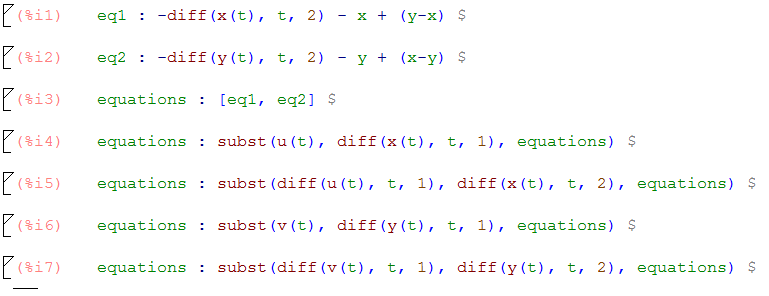
As we want to use the Runge-Kutta method as the numerical method to obtain all the data of the given equations, we need to have a system of differential equation of order 1. To do so, we will do a change of variables introducing u(t) and v(t) as follows:


Let's see each lines in details. The first two inputs are the given differential equations written as f(x, y) = 0. In the third input, we create a list with all the equations, where we will add the two new definitions of u(t) and v(t) later. In the forth and sixth, we define the u(t) and v(t) as the derivatives of the functions x(t) and y(t) respectively. And in the fifth and seventh inputs, we make the substitution of the new functions in our differential equations. Now we're with system of differential equations of order 1.
Then we prepare the inputs for the rk() function.


In the input 8, we add the definition of u(t) and v(t) to our list of differential equations. We add them as the previous, as f(x, y) = 0. In the input 9, we sum our list of differential equations with derivatives of each dependent variable, having this way the prepared input for the Runge-Kutta function. And in the input 10, we substitute the variables without the term t (the (t) was necessary for the derivatives functions, as it needs to know who depends on who). We build the missing inputs for the Runge-Kutta function in the inputs 11, 12 and 13 as the list of the dependent values, the list of the initial conditions, and a list with the independent variable and its range. Then we call the function rk() and store its output.
Now we can get the results to plot them:

First we apply the matrix function to the rk() output, then, transposing the matrix, we can get the independent values for each variable, t, x, y, u or v. 
Let's see now some graphs. First at all, the two initial differential equations are from a system of 2 coupled harmonic oscillators. So, if we plot x vs t and y vs t we can see the position of the 2 harmonic oscillators:
Another interesting graph, is if we plot y vs x, which is known as the Lissajous figure:
And finally, we can plot the speeds vs the positions (u vs x and v vs y):
This is also known as the phase diagram of the system.


Sunday, June 5, 2016

Maxima - Analytics solution

When you have an equation as F(x, y) = 0, this is an implicit solution of the equation. Sometimes you can solve this equation for y, but only if the function satisfy the implicit theorem (https://en.wikipedia.org/wiki/Implicit_function_theorem). If the equation does satisfy the conditions of the theorem, you can solve it as y = f(x). 
How to do that with Maxima? First, we will use the function solve() to obtain all the solutions of the given equation. The solve() function will give you all the available solutions if there are, or none if it can't. Then we use the output of solve() as input for sublis(). 
What does sublis()? It substitute a list of given values into a given equation. When we get the solutions with solve() we do the substitutions of the solutions by y.
Let's see an example:
 Here we defined f as an equation. With solve() we solve the equation f for y. In this example we only have a single solution, but solve() will give us all the existing solutions in a list. And finally, we give the output of solve() to sublis() to get y solved.
The previous example is too easy. Let's make a generic function which leads with multiple solutions given by solve().
 Here we iterate with a for loop over all the solutions given by solve(), and at each step, we append a new y solution to our list which will be returned as our output.
 This procedure can only be used if the function f satisfies the implicit theorem. Otherwise, we must solve the equation with numerical procedures.


Maxima - Plotting

Maxima is also a powerful plotting application (for both 2D and 3D). In this article, I going to introduce you to commands plot2d and plot3d. Both functions are very similar concerning the needed inputs, consequently, all the example I'm going to show are about plot2d but can also be applied to plot3d. As input, it needs: the function you want to plot; the limits of the plot (for 2D, the x limit is mandatory, but not the y limit, but you can also specify it (it's interesting if you got infinite values at y)); and some options (color, logarithmic scale, line style, labels...). Let's see some examples.
We start by plotting the sinus functions:
There isn't complicated. There is the sin(x) argument as the function input (we could use another variable as phi or alpha, but you'll need to add it in the second input); and then the x range (minimum and maximum). Pi is a Maxima constant, that's why I used the "%" symbol just before, otherwise Maxima will interpret it as a new variable named pi. There are a lot of constants in Maxima, and when you want to refer to one of them, just add "%" before (and check in the online manual the constant actually exists). 
Let's continue with the same example:
 Here I've added some useful options: first, I've increased the x range by multiplying by 2 the inferior limit; I've also added the y range; I've added the color of the line; and the labels for both the X and Y axis.
 And for plotting multiples functions in the same image?
 The function plot2d also accepts a list of functions as first input. But you will need to adapt all your options: you will need two colors as there are two lines; and two legends, if I haven't added the legend option, the legend will be the function itself (it's very useful for large functions to avoid having the entire function as the legend).
 And for plot3d?
Same as plot3d, I'm not going to explain again the inputs.
And now a practical exercise:
 Plot a function and its corresponding Taylor series near to a given point and for a given grade.
This is a very interesting exercise, as now you will see how the Taylor series is more accurate as you increase the grade. The function to obtain the consecutive Taylor series, was yet done in a previous article (https://physicsisbeautiful.blogspot.fr/2016/06/loops-conditions.html), so let's do the plotting part. We will use the previously said function inside our plotting function.
And here the plotting function:
First, we stock the results of the taylor_grade_n() function into a list. Then we use the plot2d() function to plot the results, but in the functions input of plot2d we must also add the original function, this way we can see the difference between the original and the Taylor series. And the last argument is that we disable the legend, as the higher grade of the Taylor series will be a large function. We could have done a legend with the grade of each function, but I let you doing this.